Dell P6524QT Collaboration Display
Product #:
ETLZ1078011445
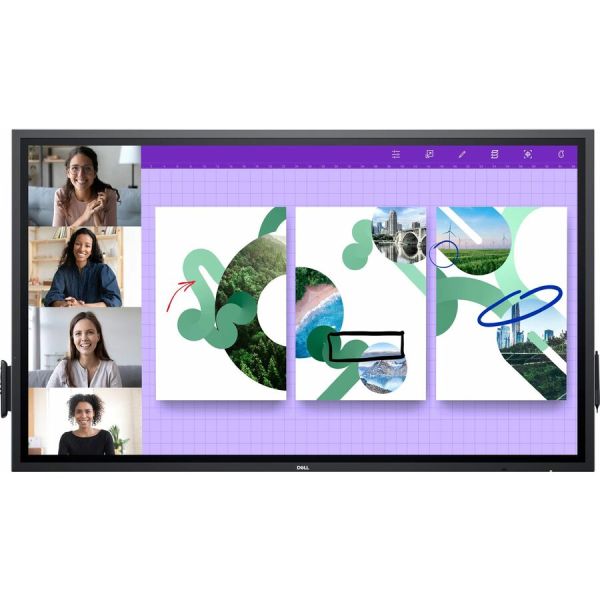


 +9
+9View All


Sold Out
This product is sold out and we do not know when we will be getting another shipment. We apologize for any inconvenience this may cause.
Check similar items above to see if a replacement product is available.
Product Description
Dell P6524QT Collaboration Display
LCD - InGlass - Touchscreen - 16:9 Aspect Ratio - 3840 x 2160 - LED - 350 Nit - 1,300:1 Contrast Ratio - 2160p - USB - HDMI
Features & Design | How teams, big and small, seamlessly collaborate | Brilliance from every angle
Stunning visuals: Make every presentation brilliant on a 65" screen with 4K UHD resolution.
Clearly captivating: Experience exceptionally sharp images and text in 4K resolution with monitor scaling technology that optimizes text and fonts for greater legibility. ComfortViewand anti-glare, anti-smudge coatings deliver greater legibility and a better extended viewing experience.
Striking presentations:No matter where you stand or sit, see consistent colors across the screen thanks to the wide viewing angle enabled by In-Plane Switching (IPS) technology.
Speak to your audience: Bring every video or audio element to life with the built-in dual 20W speakers.
Built with your whole team in mind
Inclusive for all: Dell Screen Drop is the world's first accessibility feature, designed to improve reachability for users working from different heights.
Group work without the wait: Twenty-point InGlass Touch technology allows multiple workers to interact with the screen simultaneously, eliminating wait time for more natural collaboration. And, since the touch functionality is compatible with most industry standard software, it integrates seamlessly, however you work.
Write naturally: Palm rejectionallows users to rest their hands naturally onscreen without unwanted marks.
Write in style: Mimicking a more natural writing tool, the dual-tip stylus has an ergonomic, easy-grip design, a fine writing tip and a precise eraser. It also magnetically attaches to the side of the display, so it's never misplaced.
Collaboration at your fingertips: Experience intuitive touch technology, a feature that lets you annotate with your fingers and erase with the palm of your hand.
Simplified set up
Manage your meeting spaces:With RS232, RJ45 and HDMI CEC ports, you can use remote management tools to maintain and control your Large Format monitor with a network control system.
A smooth deployment: With a few painless steps, and a couple of extra hands, it's simple to install this Dell conference room solution to a solid wall. Our displays are VESA compatible, so you can pick the mounting solution that best fits your space, whether that's a mobile cart, stand or wall mount.
All-in-one convenience: Seamlessly integrate an optional Dell OptiPlex Micro and allow IT to select the best option for varying business needs. Upgrade as you grow or easily upload your preferred corporate image with this agile display solution.
Lock it down: Reduce display changes in high traffic environments with lock mode, a feature that allows IT to control menu and power options.
Convenient connectivity
Power of USB-C: Enjoy uninterrupted productivity with up to 90W of laptop charging power via your USB-C port.
Seamless integration with Dell Meeting Space Solutions: This interactive touch monitor has been tested and validated to work with complete conference room ecosystems that include high quality audio, video and room control, powered by OptiPlex Micro.
Secure deployment: Secure your OptiPlex Micro in a powered compartment at the back of the display, for security, convenient cable management, cable security and to avoid misplacement or unintended PC user engagement.
Connect to productivity: Make your monitor a productivity hub with extensive connectivity options including HDMI, DP and USB-C that delivers power, audio and video-all in one clutt
Stunning visuals: Make every presentation brilliant on a 65" screen with 4K UHD resolution.
Clearly captivating: Experience exceptionally sharp images and text in 4K resolution with monitor scaling technology that optimizes text and fonts for greater legibility. ComfortViewand anti-glare, anti-smudge coatings deliver greater legibility and a better extended viewing experience.
Striking presentations:No matter where you stand or sit, see consistent colors across the screen thanks to the wide viewing angle enabled by In-Plane Switching (IPS) technology.
Speak to your audience: Bring every video or audio element to life with the built-in dual 20W speakers.
Built with your whole team in mind
Inclusive for all: Dell Screen Drop is the world's first accessibility feature, designed to improve reachability for users working from different heights.
Group work without the wait: Twenty-point InGlass Touch technology allows multiple workers to interact with the screen simultaneously, eliminating wait time for more natural collaboration. And, since the touch functionality is compatible with most industry standard software, it integrates seamlessly, however you work.
Write naturally: Palm rejectionallows users to rest their hands naturally onscreen without unwanted marks.
Write in style: Mimicking a more natural writing tool, the dual-tip stylus has an ergonomic, easy-grip design, a fine writing tip and a precise eraser. It also magnetically attaches to the side of the display, so it's never misplaced.
Collaboration at your fingertips: Experience intuitive touch technology, a feature that lets you annotate with your fingers and erase with the palm of your hand.
Simplified set up
Manage your meeting spaces:With RS232, RJ45 and HDMI CEC ports, you can use remote management tools to maintain and control your Large Format monitor with a network control system.
A smooth deployment: With a few painless steps, and a couple of extra hands, it's simple to install this Dell conference room solution to a solid wall. Our displays are VESA compatible, so you can pick the mounting solution that best fits your space, whether that's a mobile cart, stand or wall mount.
All-in-one convenience: Seamlessly integrate an optional Dell OptiPlex Micro and allow IT to select the best option for varying business needs. Upgrade as you grow or easily upload your preferred corporate image with this agile display solution.
Lock it down: Reduce display changes in high traffic environments with lock mode, a feature that allows IT to control menu and power options.
Convenient connectivity
Power of USB-C: Enjoy uninterrupted productivity with up to 90W of laptop charging power via your USB-C port.
Seamless integration with Dell Meeting Space Solutions: This interactive touch monitor has been tested and validated to work with complete conference room ecosystems that include high quality audio, video and room control, powered by OptiPlex Micro.
Secure deployment: Secure your OptiPlex Micro in a powered compartment at the back of the display, for security, convenient cable management, cable security and to avoid misplacement or unintended PC user engagement.
Connect to productivity: Make your monitor a productivity hub with extensive connectivity options including HDMI, DP and USB-C that delivers power, audio and video-all in one clutt
Product Specifications
-
Aspect Ratio16:9
-
Audio Line OutYes
-
Backlight TechnologyLED
-
Brand NameDell
-
Brightness350 Nit
-
Color Supported1.07 Billion Colors
-
Contrast Ratio1,300:1
-
Depth3.1"
-
DisplayPortYes
-
Display Screen TechnologyIn-plane Switching (IPS) Technology
-
Display Screen TypeLCD
-
Energy StarYes
-
Environmental ComplianceRestriction of Hazardous Substances (RoHS)
-
Environmentally FriendlyYes
-
EthernetYes
-
HDMIYes
-
Height35.2"
-
Horizontal Viewing Angle178°
-
Input Voltage120 V AC 230 V AC
-
Limited Warranty3 Year
-
Manufacturer Part NumberDELLP6524QT
-
Multi-touch ScreenYes
-
Network (RJ-45)Yes
-
Number of Network (RJ-45) Ports1
-
Number of Speakers2
-
Number of Touch Points20
-
Package ContentsP6524QT Collaboration Display 2 x Batteries 2 x Styluses Remote Control Holder 3 x Wire Saddles 2 x Stylus Nibs 1 x PC Box Holder USB-C Cable HDMI Cable SuperSpeed USB Cable DisplayPort Cable
-
Power Consumption370 W
-
Product ModelP6524QT
-
Product NameP6524QT Collaboration Display
-
Product SeriesP
-
Product TypeCollaboration Display
-
RMS Output Power40 W
-
Response Time9 ms
-
Scan Format2160p
-
Screen Mode4K UHD
-
Screen Resolution3840 x 2160
-
SerialYes
-
SpeakersYes
-
Standard Refresh Rate60 Hz
-
Total Number of USB Ports8
-
TouchscreenYes
-
Touchscreen TechnologyInGlass
-
USBYes
-
VESA Mount CompatibleYes
-
VESA Mount Standard400 x 400
-
Vertical Viewing Angle178°
-
Width59.8"